Best Badminton Video Analysis Apps in 2026: AI Form Review vs Slow-Motion & Coach Tools
Overhead badminton strokes happen faster than eye-level gym mirrors can reveal. Whether your clear falls short from late hip rotation or your split-step lags on deep backhands, choosing the right app depends on whether you want AI-written drill feedback on solo clips, skeleton tracking, manual slow-mo drawing, or shared coach spaces.
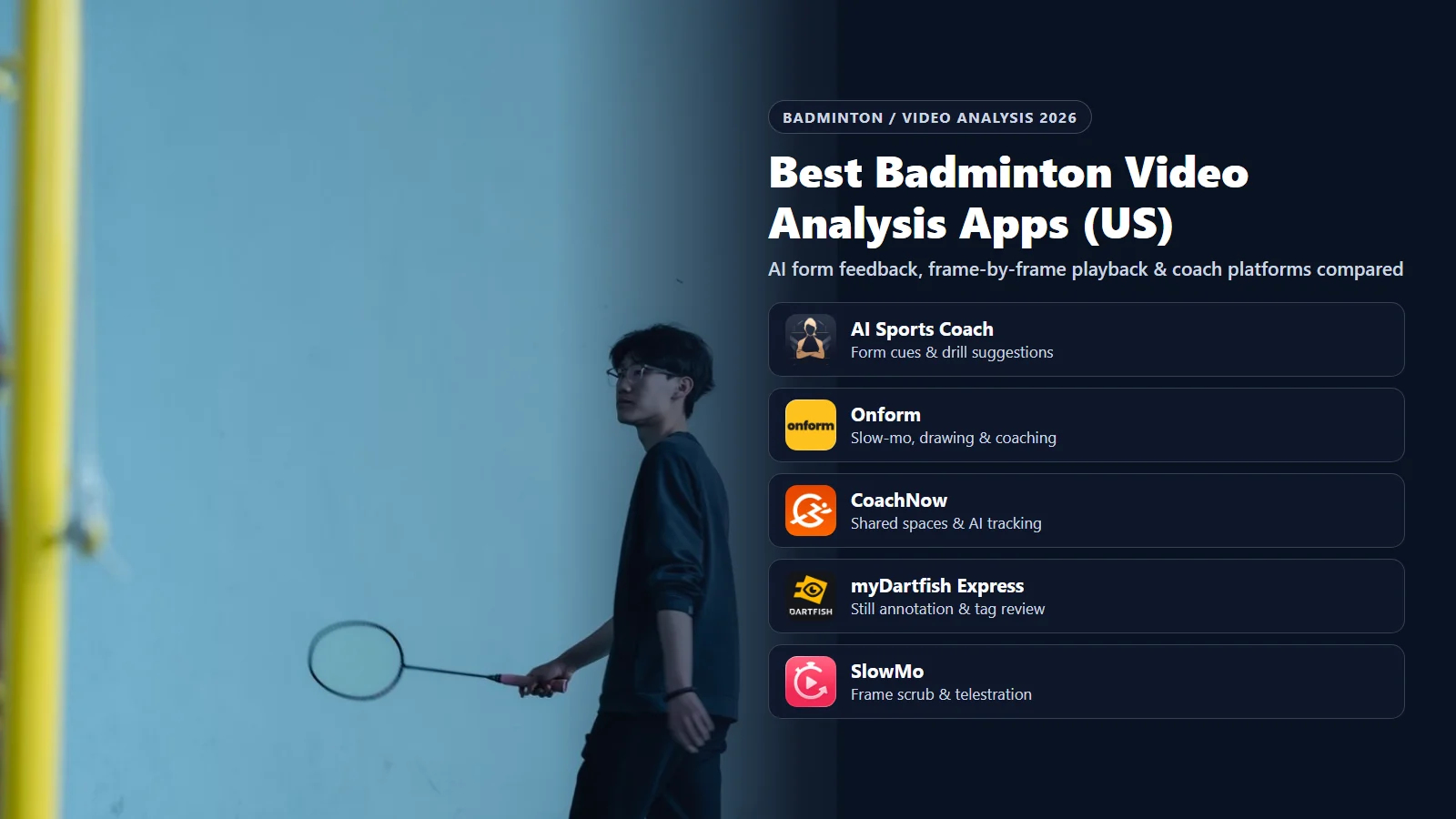
Quick Verdict: Which App Should You Pick?
Translates a solo smash, clear, or lunge clip (up to 30s) into written body-mechanics feedback, 5 metrics, and targeted drills without coach scheduling.
Combines frame scrubbing, angle lines, side-by-side overlays, and voiceover coaching across iOS and Android.
Combines shared athlete Spaces and voiceovers with AI Skeleton Tracking across iOS and Android for academies and coaches.
Simple frame scrubbing and telestration tools tailored for iOS athletes who want clean playback without full team suites (verify tier options in-app).
Side-by-Side Comparison Table (November 24–25, 2026)
| App | Core Strength | Platforms (Verified) | AI Features | Slow-Mo & Drawing | Coach Sharing | US Pricing & Tier Structure |
|---|---|---|---|---|---|---|
AI Sports Coach: Form Check | Solo AI Notes & Drills | iOS / Android | Written form critique, 5 metrics, custom drills | Replay + posture check; no drawing tool | Personal log focus (no team chat hub) | Free: 2 analyses (max 1/day); US IAP $12.99/mo or $62.00/yr |
Onform: Video Analysis App | Frame Tools + Coach Sync | iOS / Android | No general badminton AI drill coach (iOS golf 3D noted) | Yes (frame step, side-by-side, angle draw) | Yes (voiceover, chat, athlete libraries) | Free w/ coach invite; US IAP Personal $4.99/mo–Coach $299.99/yr |
CoachNow: Sports Coaching App | Coach Workspaces + Skeleton AI | iOS / Android | AI Skeleton Tracking (no written drill plans) | Yes (markup, side-by-side, voiceover) | Yes (persistent training Spaces & groups) | Free download; US IAP Athlete $29.99/yr to PRO $499.99/yr |
myDartfish Express: Coach App | Structured Video Breakdown | iOS / Android | No AI written coaching critique | Yes (slow playback, angle notes, stills) | Note export & Dartfish integration | Free download; 15-day trial noted; US IAP Mobile $79.99 / Plus $149.99 |
SlowMo - Video Analysis | Manual Slow-Mo & Drawing | iOS | None | Yes (scrub wheel, angle lines, voiceover) | Share annotated clips directly | Free download; US IAP $5.99–$69.99 (Professional/Coach memberships & packs) |
US App Store IAP items and Google Play package URLs verified November 24–25, 2026. SlowMo is verified iOS-only; the other four apps have live iOS and Android listings.
How to Choose & Film Consistently
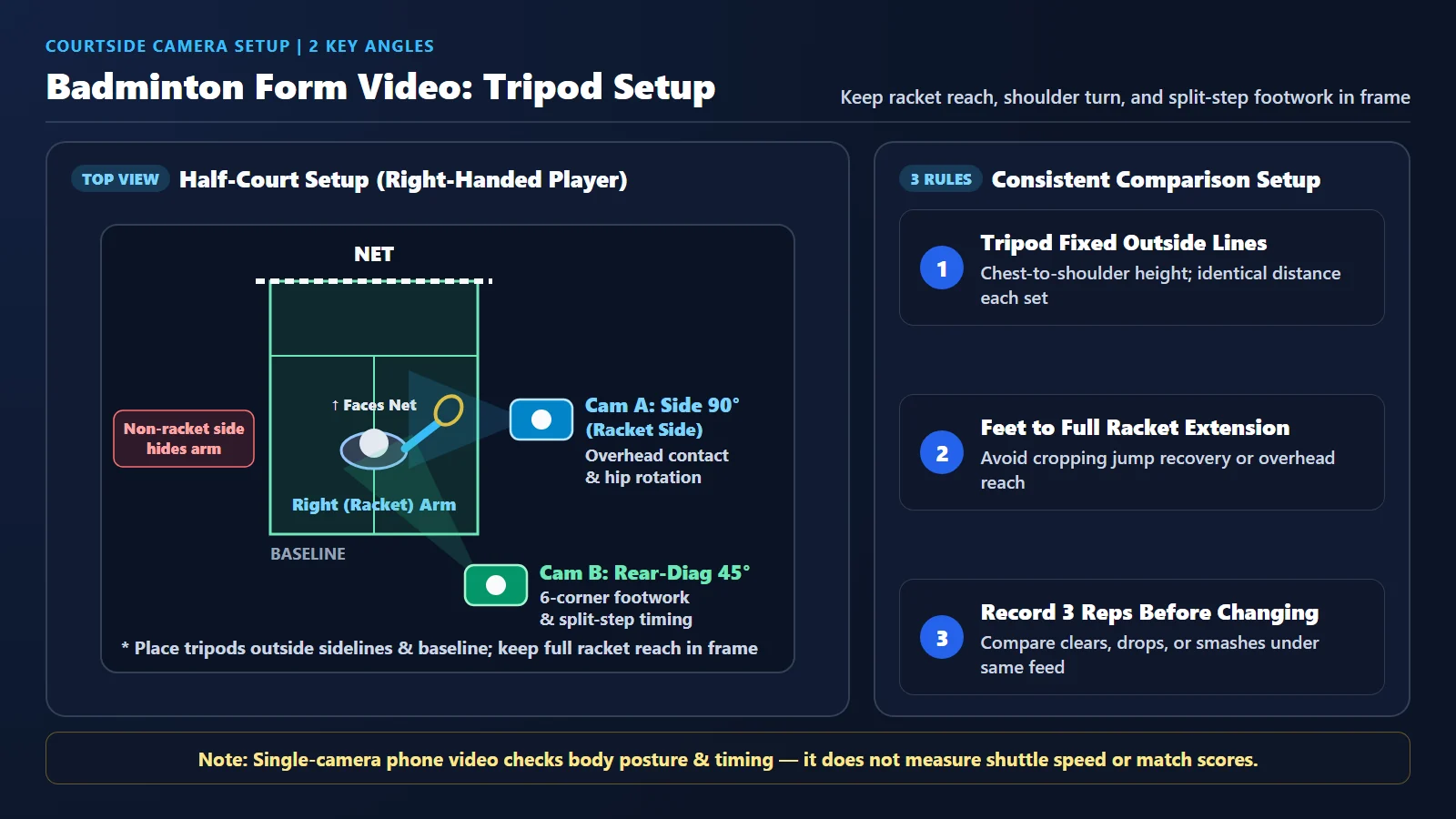
With a right-handed player facing the net at the top, the hitting arm extends toward the right sideline. Filming from the left non-racket sideline hides wrist pronation and elbow drop behind the torso.
Place Cam B outside the rear-right corner behind the baseline whenever testing split-step timing, lunge direction, and recovery speed back toward center base.
Court run-off areas are tight in shared gyms. Set tripods outside sidelines and behind baseline boundaries away from doubles movement.
Single-camera clips inspect shoulder prep, balance, and recovery posture cleanly, but cannot verify shuttlecock velocity or line calls.
App-by-App Breakdown (US App Store & Official Specs)
AI Sports Coach: Form Check
Developer: Haruto Watanabe (AI Sports Trainer Team)
Best for solo players who want next-session drills spelled out
Film one player performing smashes, overhead clears, or lunges (up to 30 seconds) on a court-side tripod and get structured AI scores plus written notes covering torso rotation, contact readiness, balance, and recovery drills—no coach scheduling required.
- Club and recreational players practicing solo without knowing what mechanic broke down
- Turning observed posture flaws into concrete footwork or swing progression drills
- Cross-platform households needing iOS and Android consistency
- Does NOT measure shuttlecock speed, contact height in centimeters, or match scores
- Does NOT track two doubles teammates simultaneously or inspect court lines automatically
- Free allowance covers 2 lifetime analyses (max 1/day); regular weekly review requires paid US IAP ($12.99/mo or $62.00/yr)
Onform: Video Analysis App
Developer: OnForm, Inc.
Best all-around slow-motion toolbox for players working with a coach
Onform combines crisp slow-motion scrubbing, two-video comparison overlays, angle lines, and voiceover messaging. Athletes invited by a coach can receive feedback free, while solo players choose personal tiers.
- Comparing early vs. late contact timing side-by-side frame-by-frame
- Remote club coaching where a coach records voiceovers directly over clip playback
- Teams spanning both iOS and Android smartphones
- Solo self-recording without an invited coach requires a paid tier (Personal $4.99/mo or Standard $9.99/mo US IAP)
- Feature depth (such as 3D skeleton tools noted on App Store for golf) varies across OS and sports
CoachNow: Sports Coaching App
Developer: Golf Genius Mobile, LLC
Best for academies combining shared Spaces with AI skeleton tracking
Built around persistent private Spaces where players, coaches, and parents share training clips and voiceover notes. Alongside side-by-side playback and markup, its App Store feature set includes AI Skeleton Tracking to inspect joint angles and body movement visually.
- Junior and academy players reviewing clips week-to-week with a coach across iOS or Android
- Adding AI Skeleton Tracking joint overlays onto side-by-side comparisons and voiceovers
- Built around human coaching workflows and visual skeleton overlays rather than automated written drill prescriptions for solo practice
- Coach tiers ($39.99–$49.99/mo US IAP) are significantly costlier than personal tiers ($9.99/mo Analyze or $29.99/yr Athlete)
myDartfish Express: Coach App
Developer: Dartfish
Best for detailed still-frame breakdowns on iOS or Android
Dartfish's mobile app focuses on technical sports review across iOS and Android: capturing or importing rallies, building step-by-step still breakdowns with angles and notes, and exporting annotated clips.
- Coaches who want annotated still sequences showing split-step, loading, and impact snapshots
- Cross-platform iOS/Android performance staff exporting structured still notes
- Steeper US IAP tiers ($79.99 Mobile / $149.99 Mobile Plus) aimed at committed coaches and athletes (15-day trial noted in store description)
- No automated AI written feedback; interface prioritizes manual technical review
SlowMo - Video Analysis
Developer: Pico Brothers Ltd.
Best iOS frame-scrubbing & telestration tool without team suites
A streamlined iOS frame-by-frame analyzer using a responsive scrub wheel, telestration drawing, angle/timer tools, and voiceovers without complex cloud workspaces.
- Checking whether overhead contact sits comfortably out in front of your hitting shoulder
- Solo iOS players who want focused slow-motion scrubbing and drawing tools
- iOS only; no AI coaching explanations or multi-athlete cloud team workspaces
- v2.8.0 App Store description references Professional and Coach memberships alongside modular US IAP items ($5.99–$69.99); verify recurring vs. one-time billing terms in-app before purchase
Practical 4-Step Badminton Video Review Loop
Because shuttle rallies move fast, changing three stroke cues at once breaks timing. Use one controlled feeder drill per week with this sequence:
- Step 1Film 3 Identical High Clears or Smashes
Keep a consistent feeder toss from the opposite half-court and record 3 full-body reps from Cam A (Side 90°, racket side) or Cam B (Rear-Diag 45°) without zooming tight on just the arm.
- Step 2Select One Single Cue to Adjust
Pick just one mechanic—such as raising your non-racket arm earlier or turning hips before elbow drive—and review the clip with AI Sports Coach, CoachNow skeleton overlay, or Onform scrubbing.
- Step 3Re-Record Immediately From the Exact Same Tripod Spot
Move only your technique cue, not your camera height or lens zoom, so before-and-after frames remain visually comparable.
- Step 4Log Effort, Fatigue & Next Target
Record which drill helped contact timing cleanly and save clips by shot type (clear, smash, net lift). Stop immediately if shoulder, elbow, or knee soreness appears.
Filming & Safety Checklist
- Position tripods strictly outside court sidelines and never inside rear baseline dive zones.
- Wear proper court shoes with clean soles and warm up rotator cuffs before overhead smash clips.
- Confirm gym or club photography rules so bystanders or minors are not inadvertently shared.
- Stop immediately if filming aggravates shoulder, Achilles, or patellar tendon discomfort.
Try AI Form Notes on Your Smash & Footwork Clips
See how AI Sports Trainer reviews overhead preparation, torso rotation, and 6-corner recovery movement from mobile video.
Frequently Asked Questions
Can a phone video analysis app measure badminton smash speed?
Not reliably from a standard court-side phone video alone. Video analysis apps inspect stroke posture, hip-to-shoulder sequence, and footwork recovery rather than calibrated shuttle radar speeds.
Should I pick an AI feedback app or a slow-motion drawing tool like Onform or CoachNow?
Choose AI Sports Coach when practicing solo and wanting written drill suggestions plus 5 form metrics. Choose CoachNow (with AI Skeleton Tracking and coach Spaces) or Onform / SlowMo / myDartfish Express when you want manual telestration lines or human coach markup.
Which badminton video apps run on Android as well as iPhone?
AI Sports Coach (Form Check), Onform, CoachNow, and myDartfish Express all have live listings on both the Apple App Store (US) and Google Play. SlowMo - Video Analysis is verified iOS-only in this comparison.
Where should I set my tripod for overhead badminton analysis?
For a right-handed player facing the net at the top, set Cam A chest-high at 90 degrees outside the right (racket-arm) sideline for overhead contact height and arm whip, and place Cam B at 45 degrees rear-diagonal behind the baseline for 6-corner footwork and split-step timing.